


Tide Charts
3.6388.00 Reviews
App Specs
- Version
- 2.44
- Updated On
- License
- Free
- Downloads
- 5,000,000+
- Developer
- 7th Gear
- Categories
- Weather
- Platform
- Android, iOS
Screenshots
 Analysis by AppCompare
On a shared phone or tablet, tide planning often starts with a small household question: is the beach walk worth packing for, and when should we leave? I like that Tide Charts is focused on tide information rather than turning that decision into a bigger planning project. It can give everyone a common reference point, while still leaving room to check local conditions and use good judgment before heading out.
A useful shared reference, not a family planner
For a household that visits the coast together, a tide chart can help turn vague plans into a practical conversation. One person can check the expected changes, then share the useful time window with the others in person. That works especially well when the group is deciding between a morning stroll, a swim, or a later visit to explore tide pools.
I would treat it as a reference tool rather than a shared calendar. Its value is the tide information on the device, not coordinating everyone’s schedule or assigning plans. If several people use one device, it is worth making sure they know which coastal location is selected before relying on what they see. A chart for the wrong place can look convincing while answering the wrong question.
Check the location before trusting the chart
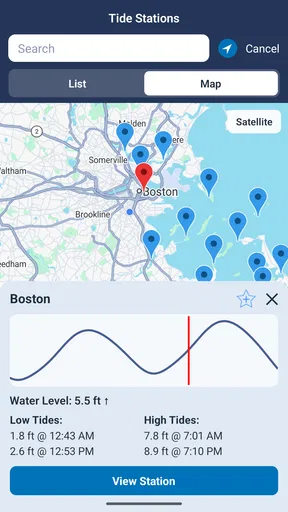
Coastal plans are unusually sensitive to location. A family visiting a new stretch of shoreline should not assume that a nearby beach has the same tide timing as the spot they intend to visit. I’d search for the actual area or check the map selection before discussing departure time, especially when the day includes more than one stop.
That simple habit also helps with shared-device use: after someone checks a destination, the next person should confirm it has not been changed before using the chart. It is a small step, but it prevents a familiar screen from creating false confidence. The app is most helpful when everyone treats the selected place as part of the information, not as a background detail.
Keep the tide check separate from the whole-day decision
Tides are only one part of a coastal outing. A favorable window does not by itself settle whether the weather will suit the group, whether the route is accessible, or whether conditions are comfortable for younger visitors. I find the best workflow is to use the chart to answer the tide question, then consult an appropriate weather source and local guidance for the rest.
That division of labor is also the main trade-off. A broad weather app may be better when the first question is rain, wind, or temperature; a general map or trip-planning tool may be better for directions and logistics. Tide Charts makes more sense when the tide itself is the detail you need to plan around. Keeping those roles clear makes its focused approach useful rather than limiting.
Worth Reading Before You Choose

EA SPORTS FC Mobile 26 Is a Bigger Football Game, but It Takes Time

Flipboard Shows What News Apps Must Do Beyond the Feed

Switching to Android Auto Means Rethinking Your Driving Routine

Google Calendar Makes a Crowded Week Easier to Manage

Ludo King Makes the Most of the Minutes Between Plans

Baby Panda World Brings Quick Play to Modern Phones, but Its Game Library Feels Busy
Age, trust, and sensible supervision
The app is rated for Everyone, so its subject matter is suitable for a broad audience. Still, a tide display is not a safety guarantee. I would explain to children that a predicted time is a planning aid, not permission to approach water, cross a tidal area, or ignore signs and adult instructions. Conditions and local hazards deserve attention on the spot.
For adults sharing a device with children, the practical boundary is simple: let the chart support a conversation, but keep decisions and supervision with the adults. There is no need to assume the app handles household profiles or parental controls. I would also avoid treating a saved or previously viewed chart as current confirmation when plans change; check the intended location again before leaving.
First Impressions and Interface
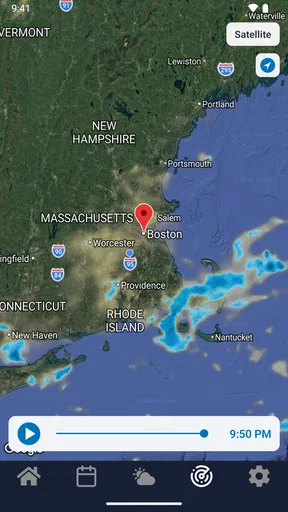
Upon launching Tide Charts, I was greeted with a clean and straightforward interface. No flashy animations or overwhelming graphics, just a simple, easy-to-navigate layout. The main screen presents a map, allowing you to pinpoint your location or enter the name of your favorite beach. It's intuitive and user-friendly, which is a big plus for those who aren't tech-savvy.
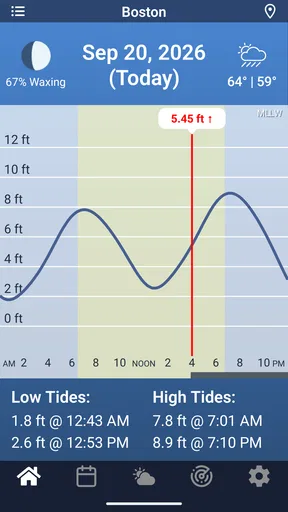
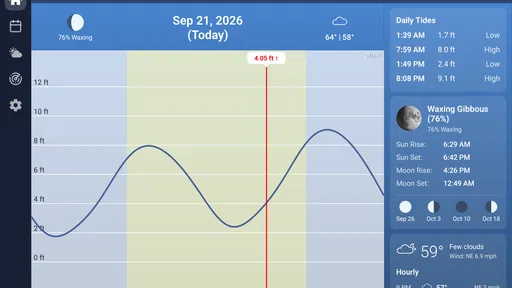
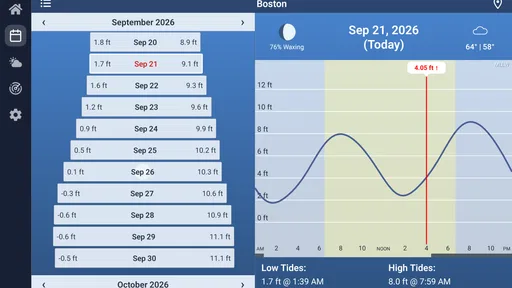
What caught my eye was the color-coded tide graph. This visual representation of high and low tides is not only informative but also aesthetically pleasing. It’s like having a personal tide guru in your pocket, ready to tell you when the waves are at their best.
Features That Stand Out
One of the coolest features of the app is its ability to provide real-time tide information. I tested it by comparing the app’s data with on-site tide markers, and it was spot on! Knowing exactly when the tide will peak or retreat is a game-changer for planning beach activities.
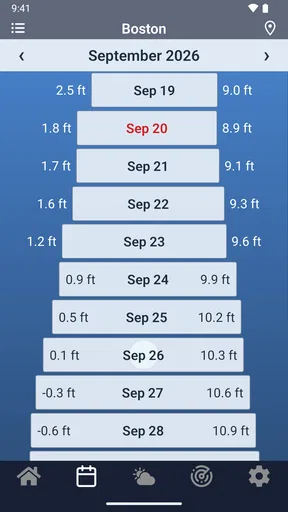
The app also offers a seven-day tide forecast. For those of us who like to plan our outings ahead of time, this feature is golden. It’s like having a weather forecast specifically for tides, and it helps avoid any surprises.
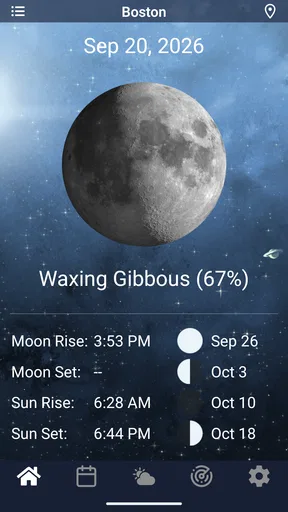
Another handy feature is the moon phase tracker. Since tides and moon phases are connected, having this info at your fingertips is a neat addition. Plus, it adds a bit of celestial flair to your tide-checking routine.
Usability and Performance
I’ve got to say, the app runs like a charm. It’s quick, responsive, and doesn’t drain your battery, which is more than I can say for some other apps I've tried. Whether you're checking the tides for a local beach or planning a trip to a new coastal spot, the app’s performance remains consistent.
One thing I appreciate is the offline mode. Even when you’re out of range, you can still access previously downloaded tide data. This feature is a lifesaver when you’re in remote areas without cell service.
What Could Be Improved?
While Tide Charts offers a lot, there are a few areas where it could step up its game. The app currently doesn’t offer much in the way of customization. It would be nice to have options to personalize alerts for high or low tides based on user preferences.
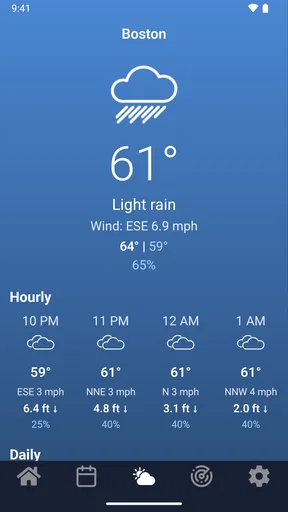
Additionally, incorporating weather conditions alongside tide data could provide an even more comprehensive planning tool. Imagine knowing not just the tide times but also the weather conditions at your favorite beach in one app!
Choosing it for the right kind of coastal day
I’d reach for this app when the tide is the central planning question: checking whether a low-water window might suit a rock-pool visit, or whether a rising tide changes the timing of a shoreline walk. For fishing, paddling, or surfing, it can help orient a plan around the tide cycle, but I would not use a tide chart alone to decide whether conditions are safe or suitable. Local forecasts, official notices, and on-the-ground judgment still matter.
A useful habit is to check the chart before making the plan, then check it again when you are ready to go. That gives you a chance to catch a location-selection mistake and to notice whether the outing still fits the expected tide timing. If you are going somewhere unfamiliar, identify the exact stretch of coast first rather than choosing the nearest place name by guesswork.
Offline convenience and its boundary
The offline capability is valuable for remote shorelines, but it is best understood as access to tide predictions already downloaded, not a replacement for every online service. I would prepare while I still had a connection: select the destination and make sure the relevant information is available before driving into an area with weak coverage. If plans change to a different beach, do not assume the previous chart answers the new question.
This distinction matters when a group is relying on one person’s phone. Before leaving, that person can show the intended location and the relevant tide view to the others, so the group is not depending on a last-minute signal or on someone remembering a chart from a different outing. The app helps with a specific piece of preparation; it does not remove the need to adapt if the destination changes.
Who benefits, and who may prefer another tool
The strongest fit is someone who regularly visits the coast and wants tide timing in a direct, visual format. Casual beachgoers can also benefit when the schedule of the water affects the activity, while people who rarely think about tides may find a general weather app more useful for everyday forecasts. If your main need is a single place to manage weather, navigation, and group plans, this focused app will not replace those separate tools.
It is free to use, with in-app purchases listed at $1.99 per item. Tide Charts is from 7th Gear, has an average rating of 3.8 from around 18,000 ratings, and has passed 1 million installs. It first appeared on July 23, 2015; version 2.44 requires Android 5.0 or later. Those details place it as an established, accessible option, though the rating suggests that a simple interface will not make it the right fit for every user.
My practical recommendation is to try it if tide predictions are a recurring part of your coastal routine, and to judge it by whether its location selection and chart presentation suit the places you actually visit. If you need extensive customization, tide alerts, or a combined tide-and-weather dashboard, the limitations described above may push you toward a different option or a second app. For straightforward tide checking, the focused approach is a reasonable trade.
Conclusion
All in all, Tide Charts is a solid app for anyone who spends time by the sea. Whether you’re a surfer, fisher, or just someone who loves a good beach day, this app is a valuable tool in your arsenal. Its accuracy and simplicity make it a standout choice for tide tracking. If you’re on the lookout for a reliable tide app, this one certainly deserves a spot on your home screen.
So, next time you're planning to hit the beach, make sure to check out Tide Charts. Trust me, you won't be left high and dry!
Pros
- Intuitive user interface for easy navigation.
- Comprehensive tide data for multiple locations.
- Customizable alerts for tide changes.
- Offline access to previously viewed locations.
- Detailed weather forecasts included.
Cons
- Limited to coastal regions only.
- Ads can be intrusive in free version.
- No social sharing features available.
- Requires location access for full functionality.
- Some features locked behind a paywall.
FAQs for Tide Charts
What features does the Tide Charts app offer?
The Tide Charts app provides real-time tide predictions, moon phases, and sunrise/sunset times for locations worldwide. It includes customizable alerts for tide changes and a user-friendly interface for easy navigation. Users can also access historical tide data and utilize GPS functionality to find nearby tide stations.
Is the Tide Charts app free to use?
The Tide Charts app is free to download and includes many features at no cost. However, there may be in-app purchases or a premium version that offers additional features such as advanced forecasting, ad-free experience, and enhanced data analytics for a more comprehensive experience.
How accurate are the tide predictions in the app?
Tide Charts uses data from reliable sources such as NOAA and other international maritime agencies to provide accurate tide predictions. While the app is generally precise, users should note that local environmental conditions can affect tides, so it’s wise to use the app as a guide rather than a definitive source in critical situations.
Can I use Tide Charts offline?
Yes, Tide Charts offers offline access to tide data. Once you download the necessary data for your selected locations, you can access tide predictions without an internet connection. This feature is particularly useful for users in remote areas or when out at sea where connectivity might be limited.
Does the app support multiple languages?
Currently, Tide Charts primarily supports English, but the developers are working on adding more languages to cater to a global audience. Check the app's update notes or settings for any newly added language options or upcoming support for additional languages.


